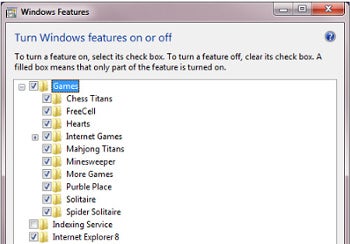
further and ban Internet Explorer completely.
further and ban Internet Explorer completely.
Web Slices is one of Internet Explorer 8’s best features. It allows you to take a slice of web and view it with one click. This capability is now available here, on The Unofficial Windows Blog. Now when you want to read our latest post all you need to do is click one button. We have made it really easy to set up. Here is how to do it:
1. Navigate to: www.theunofficialwindowsblog.blogspot.com
2. Click the Web Slice button in the Internet Explorer Toolbar

3. Click “Add to favourites”

4. To read the latest posts click the blogger icon:

European competition officials said that they were unimpressed by Microsoft's move to ship a version of Windows 7 without Internet Explorer or any other browser.
"If the commission were to find that Microsoft had committed an abuse, the commission has suggested that consumers be offered a choice of browser, not that Windows should be supplied with no browser at all," the European Union's European Commission said in a statement.
Microsoft on Thursday said that it would release a version of it’s next operating system called Windows 7 E, which would not include Internet Explorer. The firm said that it would be up to consumers and PC manufacturers what internet browser they install. The EC said that it could do more harm then good.
"Given that over 95% of consumers acquire Windows pre-installed on a PC, it is particularly important to ensure consumer choice through the computer manufacturer channel. Microsoft has apparently decided to supply retail consumers with a version of Windows without a Web browser at all. Rather than more choice, Microsoft seems to have chosen to provide less," said the EC.
Earlier this year the EC said that Microsoft’s bundling of Internet Explorer with Windows violated European anti-trust laws (funny that they don’t fine Apple). The EC has also find Microsoft with $1 billion in the past.
"Given the pending legal proceeding, we've decided that instead of including Internet Explorer in Windows 7 in Europe, we will offer it separately and on an easy-to-install basis to both computer manufacturers and users. This means that computer manufacturers and users will be free to install Internet Explorer on Windows 7, or not, as they prefer. Of course, they will also be free, as they are today, to install other Web browsers," wrote Dave Heiner, Microsoft's deputy general counsel.
In Europe Microsoft offered a version of Windows called Windows N, which did not include Windows Media Player. Windows N was highly unpopular with consumers.
Heiner said Windows 7 E will be available in 23 European languages and will ship the same time Windows 7 is delivered to the rest of the world " Oct. 22.
Its easier than ever to put Mac OSX 10.6 Snow Leopard head to head because they will be launching within a month of each other. This brings up the question: which is better? Hmm…
Windows 7 uses basically the same foundation as Windows Vista while fixing the insides and making it look better while Snow Leopard focuses more on the core.
The obvious winner is Snow Leopard. Snow Leopard is shipping in September for an upgrade price of only $29, Windows 7 does not come out until October 22 and there are roomers that it could be more expensive than Vista.
Windows 7 are designed to chew up less system resources. Apple promises that Snow Leopard will give you back 6 GB of Hard Drive space because Apple got rid of all PowerPC code. Microsoft has not talked about how much less space Windows 7 will take up, but they have came up with innovative ways for drivers to take up less space.
Internet Explorer 8 is by far the best browser Microsoft has ever made but Safari is much better at handling JavaScript which is important now of days.
Networking is much easier in Windows 7. You can now create a home network without the need to click buttons a few million times, and the new user interface makes much more sense.
Time Machine is awesome because it just works. Backups in Windows 7 is much better as well, and its written in PLAIN ENGLISH.
I personally think that the new taskbar is much better. Jump lists help when doing common tasks and Aero Peek is a nice touch. Little changes like Aero Snap, Shake and Peek also helped.
Snow Leopards UI is pretty much the same as Leopard, but it manages to improve in Exposé. You can do much more with the dock now, so you can easily drop files in whatever app window you want to. Exposé, my "I would die without it" feature in Leopard, now arranges windows in a neat grid, rather than scattering them across whatever space is available. Stacks is actually useful now too, since they're scrollable and you can look in folders within stacks in Snow Leopard.
Windows 7 backgrounds are much better. I'm kind of tired of the OSX space background, its getting old.
Windows 7 supposedly improves notebook battery life by a minimum of 11 percent. On the Snow Leopard front, well, um, all of the new Macs have much bigger batteries? Since Apple didn't drop a slide at WWDC telling the whole world, we can presume there isn't any benefit.
Windows Media Player can handle pretty much any format you throw at it. The UI is a little complex because its trying to do too much. It has some nice tweaks like play to, which will stream media to any compatible devices on your network. Quick Time 10 isthe same except the new logo. Like Windows Media Player, Quick Time can can handle almost all major formats.

As reported by CNET News there are plans to ship Windows 7 to both consumers and computer manufacturers without Internet Explorer.
Now, most people will get Windows 7 on a new PC. Presumably, in that case, the computer maker will chose to add back Internet Explorer, include one or more rival browsers, or do both.
"Microsoft recommends that OEMs pre-install either IE8 or at least one other browser of their choice before distribution. If you do this, your end users in the European territory should be able to access the Internet without any additional steps or inconvenience.” Microsoft said in a memo to PC makers.
The real hassle is for people who want to upgrade to Windows 7.
Upgrading from Windows 7 from Vista c an normally be done by simply be done by placing an upgrade disk in the computer, which would preserve the users data. However, because it removes the browser, moving to the "E" version of Windows 7 can only be done with a clean installation.
Because of that the users have no browser, therefore no way to download anything, including web browsers. So if they want to upgrade to Oprah or Firefox there is no easy way to do it. For its part, Microsoft plans to make it as easy as possible for them to get IE. It will offer it via CD-ROMs at retail stores and via FTP, an old file downloading technique that has been largely sidelined due to modern browsers.
So who benefits from a browser-less version of Windows? The PC manufacturers do! They now have a more valuable piece of real estate to sell. In the past, they could offer deals to include rival browsers as the default on a new PC, but they were still shipping a PC with Internet Explorer. Presumably now, a browser maker could strike a deal to be the only browser on a machine.
An expert said that he expects most computers to come with Internet Explorer even though the PC manufacturers will have an option.
As for Microsoft they plan to offer an Internet Pack Internet Explorer and its Windows Live programs.
Many users might have their preferred web search engine when it comes to information searching on the World Wide Web. Some prefer the Google Search Engine while others might like Yahoo, Alta Vista, Live Search and so on. By default, Internet Explorer 8 has added Live Search (formerly Windows Live Search and MSN Search) as the search engine provider for end users to search for information using the Instant Search box that appears in the upper-right corner. If Live Search is not your cup of tea in web searching, the new IE 8 browser always gives you options to add other search engines and even create your own search providers. Users can follow the following steps to add their preferred search providers.
To add other search providers to the browser, users can go to Tools and select Manage Add-ons. Users will be prompted with the Manage Add-ons Windows. Click on Search Providers and users will be shown the list of search providers to be added. 
To add more search engines to the browser, click on the “Find more search providers” link which appears on the left bottom corner. 
Users will be prompted a new Windows with a list of search providers for users to add. Users can click on the “Add to Internet Explorer” button to add a new search provider. 
After vetting through the list, probably you might not find your preferred Search Provider or perhaps you might want to add particular sites, for instance Mydigitallife, as one of your Search Providers. So, what can you do now? If this is the case, you can now DIY your own search provider. To create your own search provider, click on the link “Create your own Search Provider.” 
You will thence be directed to Add-ons gallery. 
Now open a new Windows or new tab, and type in the URL of the search engine you want to add. In this case, let’s say Yahoo search engine. At Yahoo search engine, type in the word TEST (all capital letters). 
Copy the URL of the search engine and paste it to the URL box at Add-ons gallery. Enter a name for the search provider, e.g. Yahoo Search Engine in this case. 
Press “Install Search Provider” to add Yahoo search engine as one of your search providers. You will be prompted with a dialog box to verify whether you want to add this new search provider. Click “Add” to continue. You can also check “Make this my default search provider” box to make this search provider as default. 
A similar method can also be used if you want to add, for instance Mydigitallife as one of your search providers powered by Google Search Engine (or others). By adding it in, your search result using Mydigitallife Search Provider will be limited to the Mydigitallife site only. To add Mydigitallife Search Provider powered by Google Search Engine, you can take the following steps:
Go to Google Search (if you to use Google Search Engine to facilitate the searching). Type in “TEST site:mydigitallife.info” in the search box as shown below:
Copy the URL and paste it to the URL box in the Add-ons gallery. 
Add the relevant name, key in “Install Search Provider” and follow the above mentioned steps to get Mydigitallife Search Provider added. When users search, for instance, Samsung, by choosing Mydigitallife Search Provider, the search result relevant to the word “Samsung” within the Mydigitallife site will appear.
Some people seem really concerned about cookies. The worst offenders, they argue, are so-called “tracking cookies,” which supposedly allow companies like Doubleclick to track your movements on the Internet.
If you think this is a big deal, fine. You don’t need anti-spyware software to get rid of these cookies. Instead, take the following two steps:
There. You’re done. You’re completely protected from “tracking cookies.”
But (I can hear you asking) what about first-party cookies? Well, if you’re visiting a Web site, they already have your IP address, and they have a record of every page you visit on their site and everything you type into a form. If you’re really that concerned about a Web site, you might want to avoid visiting it. But if you’re really worried about first-party cookies, open Internet Explorer’s Advanced Privacy Settings page and then click the Prompt option under the First-party Cookies heading. With Firefox, you can use an extension or set the ask me every time option. After you save these settings, you’re in complete control.
Here’s what your IE options should look like:
And here’s what Firefox options look like:
Now can we agree that there’s no need for an anti-spyware program to do something so simple?
When a Cookie is blocked you’ll get this alert:

 Posts
All Comments
Posts
All Comments